Download as usual.
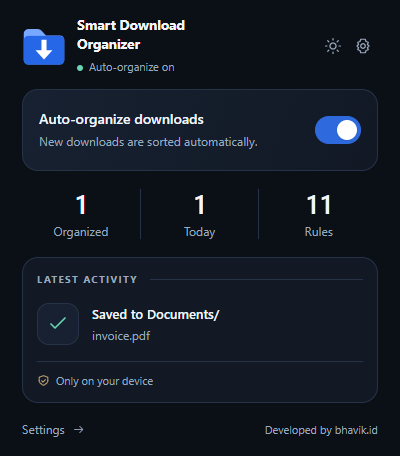
Organization starts enabled. Eleven categories cover documents, images, archives, audio, video, code, and more.
 Smart Download
CHROME EXTENSION · LOCAL BY DESIGN
PDFs in Documents. Photos in Images. ZIPs in Archives. Give new downloads a useful home, automatically.
Chrome Web Store listing coming soon.
LESS SORTING. MORE DOING.
Organization starts enabled. Eleven categories cover documents, images, archives, audio, video, code, and more.
Rename folders or add a simple rule like epub → Books. Turn off any category or pause all organization.
Filename metadata is processed locally. Preferences and aggregate counters stay in local extension storage.
CLEAR BOUNDARIES
No file uploads, browsing-history collection, or page-content inspection. No account to create.
The extension chooses folders inside Chrome’s configured Downloads location. It does not move existing files. Unknown types stay untouched unless you enable Other. Save As dialogs, browser controls, and other download extensions can change the final destination.
Chrome’s “Manage your downloads” permission lets the extension choose a destination and confirm recent completions. It never cancels, deletes, or automatically overwrites your files. The Organized counter measures suggested destinations; a Saved result requires a verified completion.